Often in spatial analytics, you’ll need to find the closest spatial object to another. The most intuitive way to do that is through the Find Nearest Tool, which specifically captures the ability to find the shortest distance between spatial objects in one file (targets) and a user-specified number of objects in another file (universe objects). This tool does an amazing job of simplifying the process of finding the nearest object to another but it can also add significant time to your workflow.
I often elect for an alternative method that has trimmed significant run time off of many of my spatial workflows. That is, using the Append Fields Tool to duplicate your target spatial objects for each universe and using the Distance Tool to calculate DriveTime. After that’s done, simply add on a Summarize Tool, group by the target and take the “Min” DriveTime for each. You could also sort ascending by DriveTime and sample for the first target by grouping with that field. There is a caveat, however, as the Append Fields Tool drastically increases the number of records in your input and will only speed up the process if there are significantly more targets than universes.
These methods are distinct in that the Find Nearest Tool must do a DriveTime run from each target spatial object to each universe spatial object (200 DriveTime passes in Example 1) whereas the Distance Tool approach already has all the points available to it and recognizes that there are many more targets than universes. As a result, it runs the reverse-direction DriveTime calculation starting from each universe to all target spatial objects at once (5 DriveTime passes in Example 1). If it is quicker for you to use the Find Nearest Tool, be sure to shed the spatial objects you no longer need in your workflow as soon as possible, even inside the Find Nearest Tool’s configuration if possible. That could also reduce your run time due to the sheer size of the spatial object datatype. Below are some examples of the methods. They can also be seen in the attached workflow,AppendAlternative.yxzp.
Example 1
Targets: 200
Universe Objects: 5
Attempt 1: Find Nearest Tool
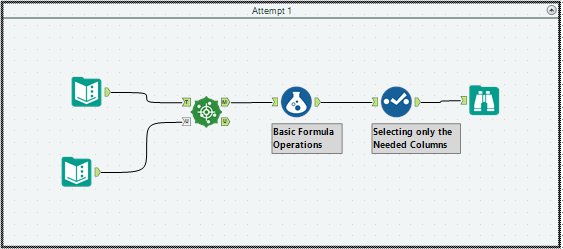
Run Time: 8 minutes 13 seconds
Attempt 2: Append Fields Tool and Summarize
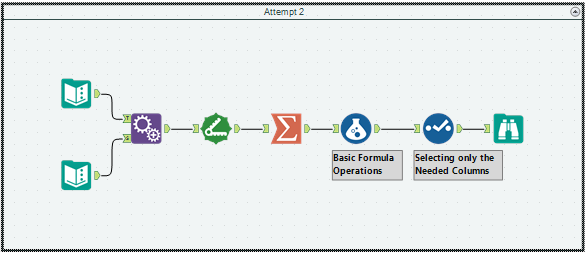
Run Time: 11.9 seconds
Example 2
Targets: 100
Universe Objects: 52
Attempt 1: Find Nearest Tool
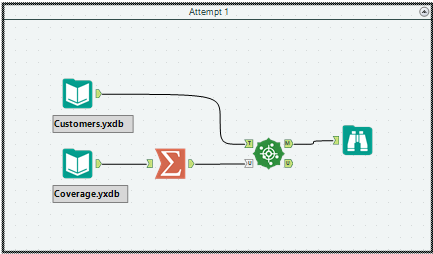
Run Time: 49.7 seconds
Attempt 2: Append Fields Tool and Summarize
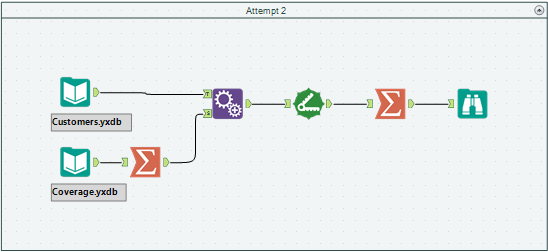
Run Time: 12.6 seconds