Knowledge Base / Designer / Error: "Alteryx is not installed" error occurs when installing Predictive Tools or Alteryx Inte...
Issue
Installing Alteryx Intelligence Suite (AIS) or Alteryx Predictive Tools fails with the following error:
Alteryx is not installed. <PRODUCT_NAME> can not continue
Example when installing Alteryx Predictive Tools:
Example when installing Alteryx Intelligence Suite:
Environment
- Alteryx Designer, Server
- Versions: All
- Alteryx Predictive Tools
- Alteryx Intelligence Suite (AIS)
Cause
The error can happen for any of the following conditions:
- An incorrect Alteryx version is used.
- If the Installinfo.ini (version < 2022.3) or InstallInfo.xml (version >= 2022.3) file is not found.
- Windows Installation permission.
Note: In Alteryx version 2022.3 and above, the InstallInfo.ini is replaced by InstallInfo.xml.
Resolution
Please perform the following steps:
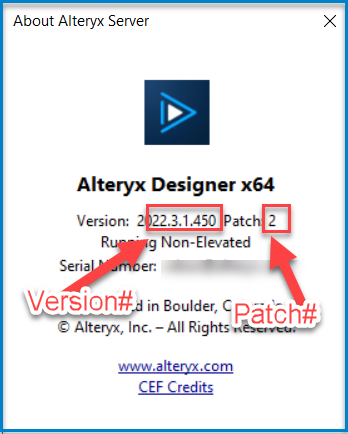
- Check if the correct Alteryx Predictive Tools/Alteryx Intelligence Suite version installer is being used. First, go to Help > About in Designer to check the Designer version and whether Admin or Non-admin version is being used.
Examples:
For Alteryx Designer Admin version and Alteryx Server version
- Use Alteryx Predictive Tools Admin version
Installer name: RInstaller_<Version>.exe
Example:
RInstaller_2022.1.1.25127.exe
- Use Alteryx Intelligence Suite Admin version
Installer name: AlteryxAISInstall_<Version>.exe
Example:
AlteryxAISInstall_2022.1.1.25127.exe
For Alteryx Designer Non-admin/User version
- Use Alteryx Predictive Tools Non-admin version
Installer name: RNonAdminInstall_<Version>.exe
Example:
RNonAdminInstall_2022.1.1.25127.exe
- Use Alteryx Intelligence Suite Non-admin version
Installer name: AlteryxAISNonAdminInstall_<Version>.exe
Example:
AlteryxAISNonAdminInstall_2022.1.1.25127.exe
- If the correct Alteryx Predictive Tools/Alteryx Intelligence Suite version is used, check whether you have the InstallInfo.ini (version < 2022.3) or InstallInfo.xml (version >= 2022.3) file in the following location:
Note: In Alteryx version 2022.3 and above, the InstallInfo.ini is replaced by InstallInfo.xml.
For Alteryx Designer Admin version and Alteryx Server version
Location: C:\ProgramData\Alteryx\Engine\<Version>
Example:
For Alteryx Designer Non-admin/User version
Location: C:\Users\<User>\AppData\Roaming\Alteryx\Engine\<Version>
Example:
If for some reason, you do not have the <Version> folder in the mentioned location, please create one and follow the instructions below to add the InstallInfo.ini (version < 2022.3) or InstallInfo.xml (version >= 2022.3) file.
For version < 2022.3
For Alteryx Designer Admin version
[Settings]
InstallDir64=<INSTALL_PATH>\Alteryx\bin
InstallTitle=Alteryx <VERSION> x64
For Alteryx Server version
[Settings]
InstallDir64=<INSTALL_PATH>\Alteryx\bin
InstallTitle=Alteryx <VERSION> x64 Server
For Alteryx Designer Non-admin/User version
[Settings]
InstallDir64=<INSTALL_PATH>\Alteryx\bin
InstallTitle=Alteryx <VERSION> x64 (User)
NOTE: Please replace <INSTALL_PATH> with the location where Alteryx Designer is installed and <VERSION> with the installed Alteryx version.
Examples of the value for InstallDir64:
InstallDir64=C:\Users\admin\AppData\Local\Alteryx\bin
InstallDir64=D:\Alteryx\bin
InstallDir64=C:\Program Files\Alteryx\bin
Examples of the values for InstallTitle:
InstallTitle=Alteryx 2022.1 x64
InstallTitle=Alteryx 2021.4 x64 (User)
InstallTitle=Alteryx 2021.3 x64 Server
An example of the content in the InstallInfo.ini:
For version >= 2022.3
If the InstallInfo.xml file is missing, please create one with the following content or use the InstallInfo.xml in this article. Do note you still need to modify the attached InstallInfo.xml to reflect the correct version, title, install location and patch number.
For Alteryx Designer Admin version
For Alteryx Server version
For Alteryx Designer Non-admin/User version
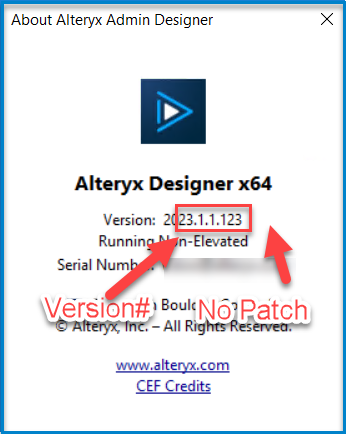
NOTE: Please replace INSTALL_PATH with the location where Alteryx Designer is installed, VERSION with the installed Alteryx version and the VERSION# and PATCH# with the version and patch number obtainable from the About window in Designer.
Examples of the value for InstallDir64 element:
<InstallDir64>C:\Users\admin\AppData\Local\Alteryx\bin</InstallDir64>
<InstallDir64>D:\Alteryx\bin</InstallDir64>
<InstallDir64>C:\Program Files\Alteryx\bin</InstallDir64>
Examples of the value for InstallTile element:
<InstallTitle>Alteryx 2022.3 x64</InstallTitle>
<InstallTitle>Alteryx 2023.1 x64 (User)</InstallTitle>
<InstallTitle>Alteryx 2023.1 x64 Server</InstallTitle>
Examples of the values for PatchNumber element:
<PatchNumber>23.1.1.123_0</PatchNumber>
<PatchNumnbr>23.1.1.200_1</PatchNumber>
<PatchNumber>23.1.1.247_2</PatchNumber>
<PatchNumber>22.3.1.450_2</PatchNumber>
NOTE: "0" in <PatchNumber>23.1.1.123_0</PatchNumber> indicates no patch.
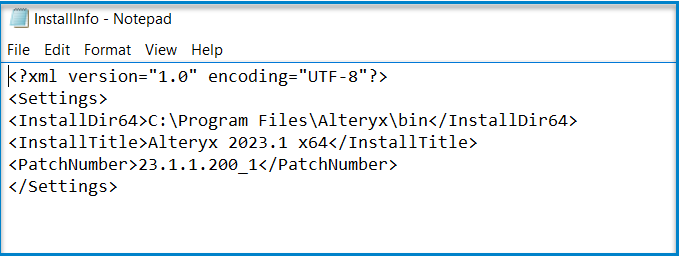
An example of the content in the InstallInfo.xml:
For Alteryx Designer Admin version
<?xml version="1.0" encoding="UTF-8"?>
<Settings>
<InstallDir64>INSTALL_PATH\Alteryx\bin</InstallDir64>
<InstallTitle>Alteryx VERSION</InstallTitle>
<PatchNumber>VERSION#_PATCH#</PatchNumber>
</Settings>
For Alteryx Server version
<?xml version="1.0" encoding="UTF-8"?>
<Settings>
<InstallDir64>INSTALL_PATH\Alteryx\bin</InstallDir64>
<InstallTitle>Alteryx VERSION Server</InstallTitle>
<PatchNumber>VERSION#_PATCH#</PatchNumber>
</Settings>
For Alteryx Designer Non-admin/User version
<?xml version="1.0" encoding="UTF-8"?>
<Settings>
<InstallDir64>INSTALL_PATH\Alteryx\bin</InstallDir64>
<InstallTitle>Alteryx VERSION (USER></InstallTitle>
<PatchNumber>VERSION#_PATCH#</PatchNumber>
</Settings>
NOTE: Please replace INSTALL_PATH with the location where Alteryx Designer is installed, VERSION with the installed Alteryx version and the VERSION# and PATCH# with the version and patch number obtainable from the About window in Designer.
Examples of the value for InstallDir64 element:
<InstallDir64>C:\Users\admin\AppData\Local\Alteryx\bin</InstallDir64>
<InstallDir64>D:\Alteryx\bin</InstallDir64>
<InstallDir64>C:\Program Files\Alteryx\bin</InstallDir64>
Examples of the value for InstallTile element:
<InstallTitle>Alteryx 2022.3 x64</InstallTitle>
<InstallTitle>Alteryx 2023.1 x64 (User)</InstallTitle>
<InstallTitle>Alteryx 2023.1 x64 Server</InstallTitle>
Examples of the values for PatchNumber element:
<PatchNumber>23.1.1.123_0</PatchNumber>
<PatchNumnbr>23.1.1.200_1</PatchNumber>
<PatchNumber>23.1.1.247_2</PatchNumber>
<PatchNumber>22.3.1.450_2</PatchNumber>
NOTE: "0" in <PatchNumber>23.1.1.123_0</PatchNumber> indicates no patch.
An example of the content in the InstallInfo.xml:
NOTE: If the above steps have been tried and you are still running into the same error, the error may be related to Windows Installation permission, in this case, please try running the installer in elevated mode (using run as administrator). If the error still occurs, please follow the instructions in the article here to enable installer logs and provide them to Alteryx Support for further assistance.
Additional Information
Attachments