This article is part of the "Guide to Creating Your Own Connector" series
Handling Errors
Now you are ready to take your workflow one step further and add some error checking. If something is wrong with your request or something goes wrong on the server, an API will usually return an error message. It is useful to capture this information and clearly display it to the user of the connector. The Message tool will come in handy here. It will help you to troubleshoot the error and actually stop the workflow from processing if you would like. The Download toolreturns two fields, “DownloadHeaders” and “DownloadData”. The HTTP status codes are returned via the “DownloadHeaders” field. The actual data provided by the API will be contained in the “DownloadData” field. Below is an example of what a workflow would look like.
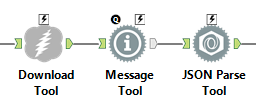
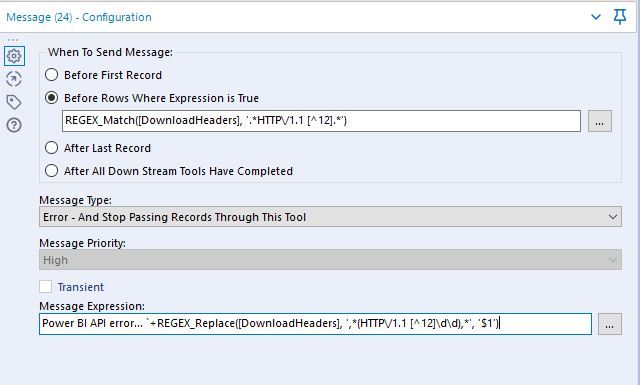
The Message tool should be placed after the Download tool, but before the parsing tool in your workflow. Placing the message tool here ensures the workflow will stop running when it encounters an error. In the Configuration window, you will select “Before Rows Where Expression is True”. The REGEX expression below says to throw an error when the HTTP status code (returned in the “DownloadHeaders” field) starts with something other than a 1 or 2. APIs return header information in different ways so you will probably need to tweak the header parsing algorithm to suit your use case. The Message Type will be “Error - And Stop Passing Records Through This Tool”. The Message Expression should include the Headers and Data info from the API. This will help to troubleshoot the error.
Some classes of errors you may encounter are listed below. A detailed list of HTTP status codes is located herefor reference.
- 1xx Informational - Indicates the request was received.
- 2xx Success - Indicates the action requested by the client was received, understood, accepted, and processed successfully.
- 3xx Redirection - Indicates the client must take additional action to complete the request.
- 4xx Client Error - intended for situations in which the client seems to have erred.
- 5xx Server Error - Indicates the server failed to fulfill an apparently valid request.
Throttling
If the API you are connecting to has request limitations, like 5/10 per second, it can be useful to use a Throttle tool to precede the Download tool, so that only a certain number of records are passed through at a certain time.