Welcome to the Alteryx Knowledge Base
Created/Edited -
Even though I have Administrator privileges on my computer and run the Administrator version of Alteryx there are still somethings in Alteryx that seem to need a little extra administrator encouragement. To help get around this I typically run Alteryx as an Administrator. This can typically be done by right clicking on the Alteryx shortcut on your desktop and choosing "Run as Administrator."
However, I found this to be fairly tedious to do or sometimes I would for get to Run as Admin and have to close Alteryx and start my process all over.
An easy way to get around this is to configure your Alteryx shortcut to always run as an Administrator.
Here's how to do it:
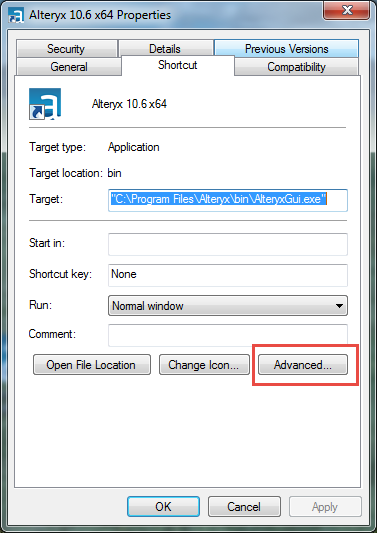
- Right click on the Alteryx Shortcut and go to Properties
- Click on the Advanced button in the lower right
- Check the box for Run as Administrator
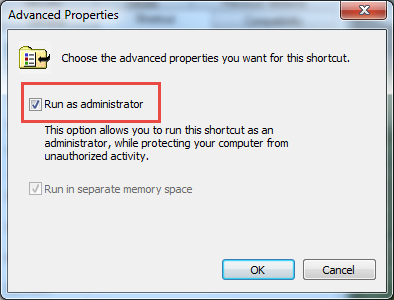
- Click OK
- And then OK Again
- You are all set!
Now, whenever you start Alteryx it will always be run as an administrator.