How to sort In-Database
Suppose you're using the In-DB tools and at some point you want to sort your data... in database. You notice there isn't a Sort In-DB tool available. Do you need to stream your data out, sort your data and then stream your data back in to the database? You could, however you don't have to. You can get the same results using the Sample In-DB tool .
- Alteryx Designer
- Versions All
- In-Database
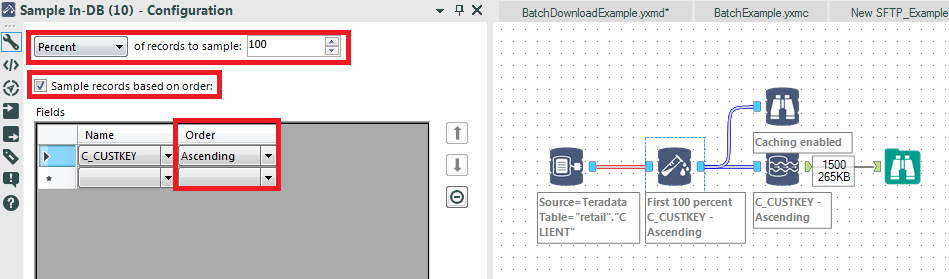
In the example below, we're connecting to a Teradata database and reading a retail customer file containing 1500 records but the process is database independent. The Sample In-DB configuration is the important piece to the solution.
- Select 'Percent' in the dropdown and sample 100%.
- Check the 'Sample records based on order' checkbox
- Select the field(s) want to sort and what order you want the data sorted (Ascending/Descending).
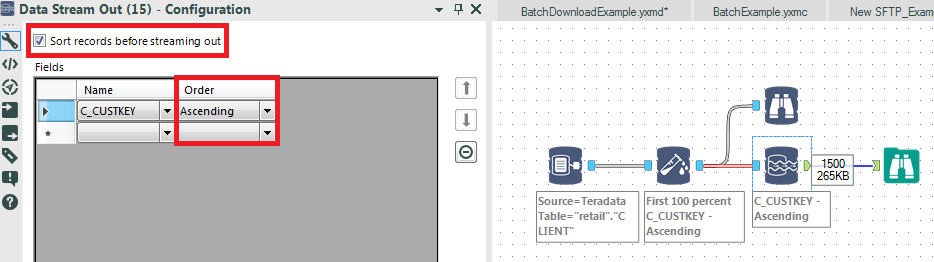
- Please note: If you decide to stream your data out as some point, you have the option of sorting your data in the Data Stream Out tool as well. See below:
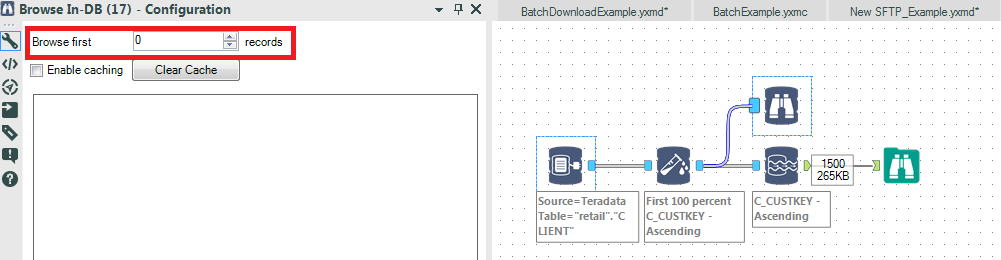
- Next, Attach a Browse In-DB tool to your Sample In-DB, set the 'Browse first N records' to 0. This will display all records in the order you specified. At the time of this writing, any value other than 0 may not display results in the proper sort order (solution pending).
The attached sample workflow is an example showing the tools used to apply sorting. Please note you need to configure the In-DB Connect tool to your specific database environment and set field and other parameters to requirements.