Learn how to make left, right and full outer joins in Alteryx Designer.
Alteryx Designer
What does the Join Tool do?
For now, the join tool does a simple inner join with an equal sign. That's it!
In particular:
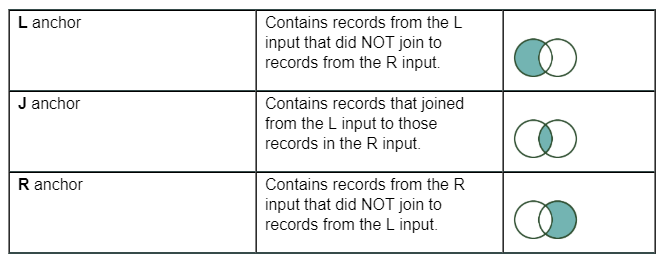
• R output anchor is NOT the result of a right outer join. I know the R letter can make you think this but it is not.
• Similarly: L output anchor is NOT a left outer join. I know that got me at first too!
See the table below that shows you what each does for the “Join” tool:
Look at the online help to learn more: https://help.alteryx.com/current/Join.htm
Can I do outer joins with the Join Tool then?
Yes! You have to combine it with a Union Tool:
- Join Tool + Union of L&J output anchors = Left outer Join,
- Join Tool + Union of R&J output anchors = Right outer Join,
- Join Tool + Union of R+L+J output anchors = Full Join.
Look at the online help to learn more: https://help.alteryx.com/current/Join.htm
Use "Multiple Join" for Full outer join
In Designer, click on the "open example" link that appears once you click on the "Multiple Join" tool for detailed examples.
Note: as Alteryx improves the "Join Tool", we might see an easier way to do outer joins. But for now, these are the few options you have.