Welcome to the Alteryx Knowledge Base
Created/Edited -
Question
My code runs in R, but not in the R Tool?
Answer
For many users this question can be frustrating and difficult to resolve. This articile provides a few tips that can help with seemless integration from R to the R Tool.
Tip 1: Trouble Shooting
Debugging code running in the R Tool can be difficult, but there are quick and easy tricks to make the process easier:
Print Statements
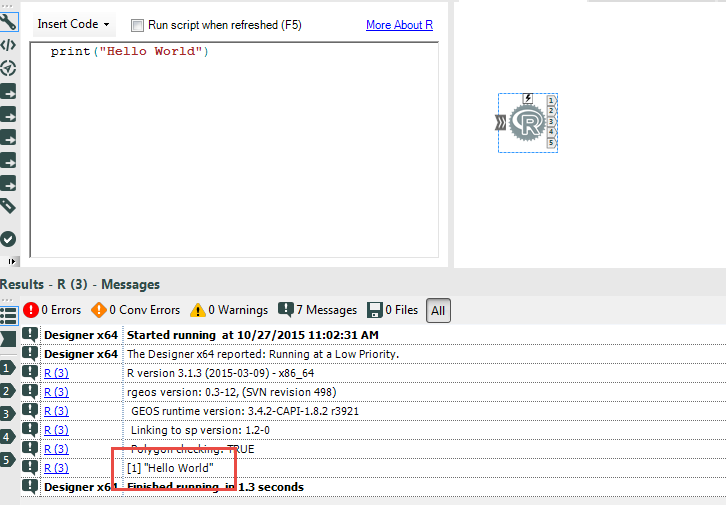
Output printed to the R command line during execution is automatically passed to the Alteryx message log. This means you can easily add print statements into your code to view data, script progress, etc:
Saving the Workspace Image
You can also save the image of the Alteryx R session, and then load that image into software with interactive debugging tools like RStudio. To do this, insert the following line of code into your R script:
save.image('.Rdata')
All the variables in your R script will be saved as they exist when the save.image command is invoked. ( For example, you could include this command at the beginning, middle, and end of a script to get a sense for how variables are changing). This trick is especially useful to check if the variables are being read into the R Tool as you expect.
Tip 2: Object Classes
Many common issues arise from trying to read/write objects of the incorrect class:
- Alteryx can READ data as a list or as a data frame.
- Alteryx attempts to WRITE data out as a data frame. The technical details of this process are carried out through functions available in the AlteryxRDataX package which is typically located in C:/Program Files/Alteryx/R-#.#.#/library/. I have attached an annotated R script with these functions, but here is the moral of the story: If you can coerce your results into a data.frame, do it!